

Free CRM for Gmail in 2026: Free Plans, Limits and Trials
Find out which free CRM plans work with Gmail, how user and record limits differ, and why Streak's email tools and Talvu's trial belong in separate categories.
HubSpot and Capsule offer permanent free CRM plans with usable Gmail tools. HubSpot supports two users and 1,000 contacts; Capsule supports two users and 250 contacts. Zoho CRM is free for three users, but its Gmail add-on requires a paid edition. Salesforce Free Suite includes two users and basic Google email integration, with automatic activity capture reserved for paid access.
Streak's free email tools and Talvu's 14-day trial are different offers. Neither should be presented as a free CRM you can keep editing indefinitely.
Official plan and help pages were checked on November 1, 2026. The broader Gmail CRM comparison also covers paid products.
First, separate a free CRM from a free trial
A permanent free plan lets you continue using a restricted CRM without a subscription. A trial temporarily opens paid functionality. A free email extension may supply tracking or templates without an editable contact database, deal records or team CRM.
Also check what “Gmail integration” means. An add-on can let you save a conversation manually. An extension can show contact details beside a message. Email sync can copy activity in the background. Having one does not establish that the others are included.
Check whether the free edition supports your routine: save the customer, record the conversation, set a follow-up and find the history later. Features shown during onboarding may belong to a trial.
Permanent free plans and their Gmail conditions
| CRM | Free users | Verified record or storage limit | What you can expect around Gmail | Important boundary |
|---|---|---|---|---|
| HubSpot | 2 | 1,000 contacts; 1,000 records across other standard object types | Gmail Chrome extension, email logging and tracking | Free tools have individual usage limits; expanded access costs extra |
| Capsule | 2 | 250 contacts, 5 custom fields, 1 sales pipeline | Gmail add-on can save contacts and track selected conversations | Contact-wide automatic email sync requires Growth or higher |
| Zoho CRM | 3 | 5,000 records across all modules, within 10 MB of data storage | Free CRM can hold customer records, but the documented Gmail add-on is paid | Gmail add-on requires Standard or higher; email integration is also paid |
| Salesforce Free Suite | 2 | 10 GB minimum data storage per organization; contact-count ceiling not verified | Basic Google email and calendar integration | Einstein Activity Capture is included on eligible paid editions, not Free Suite |
Plan sources: HubSpot free tools, Capsule pricing, Zoho's edition comparison and Salesforce's features and allocations.
These limits measure different things. Zoho's 5,000 records are shared across modules, so that is not an allowance of 5,000 contacts plus 5,000 deals. Salesforce's storage figure does not establish an unlimited contact allowance. Size your expected database before importing it.
HubSpot: free Gmail logging for one or two people
HubSpot is a useful starting point for a customer database with Gmail logging and tracking. Its free CRM offer has no time limit, subject to user and record caps. Our HubSpot Gmail guide explains the connection model.
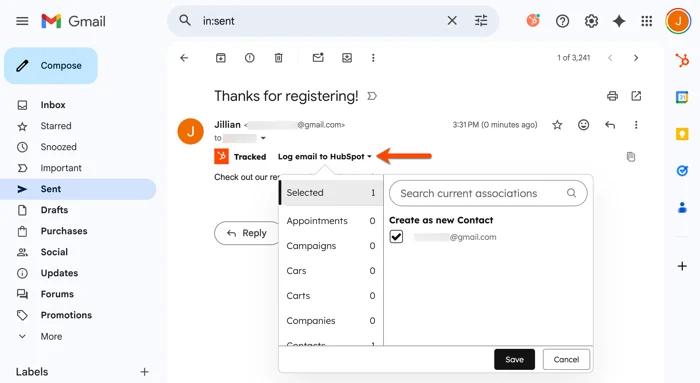
The Chrome extension works in Gmail. For retroactive logging, connect your individual email, open a sent or received message, choose Log email to HubSpot and select the CRM records. Logging and tracking are distinct: storing a message in CRM is different from receiving an open notification. HubSpot documents both the logging requirements and the extension setup.
Free usage still has limits. HubSpot's product catalog lists 200 email-tracking notifications per month, while the free pricing comparison limits email templates to three per account. These limits can matter before you reach 1,000 contacts. HubSpot's free-tool catalog is the place to check individual allowances.
Choose it when two users can maintain a small shared database. Reconsider it if a third person or paid sales functionality is already essential; assess the actual paid plan before building your process around it.
Capsule: a smaller database with a Gmail add-on
Capsule's free plan is narrower on contact capacity: two users, 250 contacts, five custom fields and one sales pipeline. It can suit an independent professional with a compact client list better than a business importing years of prospect data. Those are permanent free-plan limits, distinct from Capsule's paid-plan trials. Capsule pricing sets out the offer.
The Gmail add-on is available on all plans. It can create contacts, tasks, sales opportunities and projects from Gmail. Once you choose to track a conversation, it stores future messages in that conversation too. You do not have to save every reply separately. Capsule's Gmail add-on guide documents that behavior.
The condition is scope. Following a selected thread is different from automatically collecting email against all chosen contacts. Capsule lists the broader Email Sync feature on Growth and higher plans. If your main requirement is hands-off capture across many conversations, the free add-on does not establish that you have it.
Choose Capsule when 250 contacts are enough and selectively storing relevant conversations is acceptable. If you already exceed that allowance, compare a paid plan rather than repeatedly deleting useful customer history to stay free.
Zoho CRM: three free users, with a paid Gmail boundary
Zoho CRM's free edition provides up to three users and 5,000 records across all modules within 10 MB of data storage. Its file allowance is separate at 1 GB. The extra user can be useful for a three-person team, but record capacity and Gmail access need separate checks. Zoho's feature comparison is more precise about those limits than a generic free-CRM description.
The same comparison excludes the Zoho CRM for Gmail add-on from Free and includes it from Standard upward. Email integration through IMAP, POP3 or the Gmail API is also excluded from Free. A Google sign-in or a free CRM account should not be read as proof of a free synchronized inbox.
The paid add-on can add leads or contacts, update their details and associate emails with them. That is useful functionality, but it does not belong in the free column. Zoho's add-on setup guide describes those actions.
Choose Zoho Free when the three-user CRM database meets your needs and manual work outside Gmail is acceptable. If updating CRM records beside email is essential, include the upgrade cost in your comparison. Free access to a separate browser extension has not been verified here.
Salesforce Free Suite: basic Google integration with two seats
Salesforce now offers a permanent Free Suite for up to two users. It includes account, contact, lead and opportunity management, tasks, reports and basic email and calendar integration. Its published allocation includes 10 GB of data storage per organization and 25 custom fields per object, with no custom objects. Salesforce's allocation table distinguishes it from Starter and Pro Suite.
The Gmail qualification matters. Salesforce describes Free Suite's email integration as basic, and its comparison chart identifies Google support. Paid Starter includes Einstein Activity Capture. Do not interpret the free edition's Google connection as the same automatic email and calendar capture included on paid editions. Salesforce's suite comparison shows the distinction.
Free Suite also allows 100 marketing email sends per month. That is a marketing allowance, not a quota for your normal Gmail mailbox. Salesforce requires users to log in at least every 60 days to keep free access active, and Free Suite does not include its paid Standard Support plan. Salesforce's free support policy explains those conditions.
Choose it if your small team wants to start in Salesforce and can work within the free edition's limits. Choose an eligible paid edition if automatic activity capture is a requirement from the start.
Streak's free email tools do not include an editable full CRM
Streak offers free email and link tracking, snippets, thread splitting and mail merge with a 50-email daily limit. Its full CRM and shared pipelines require a paid plan. If you cancel paid access, existing pipelines and boxes become view-only rather than continuing as an editable free CRM. See Streak pricing and its cancellation guide.
This may be enough if you only need a few email tools. It is unsuitable as a free-plan recommendation for someone who needs to keep changing deal stages and customer records. The Streak review explains its paid Gmail workflow; the Streak alternatives comparison covers possible replacements.
Talvu: a full-feature trial with a clear end date
Talvu offers a 14-day trial with all features, without requiring a payment card. The trial begins at the first successful Gmail connection. Continued working access is paid: $15 monthly, $72 for six months or $120 yearly. It belongs in a trial shortlist, not a permanent free-plan table. Talvu's billing guide gives the billing periods and totals.
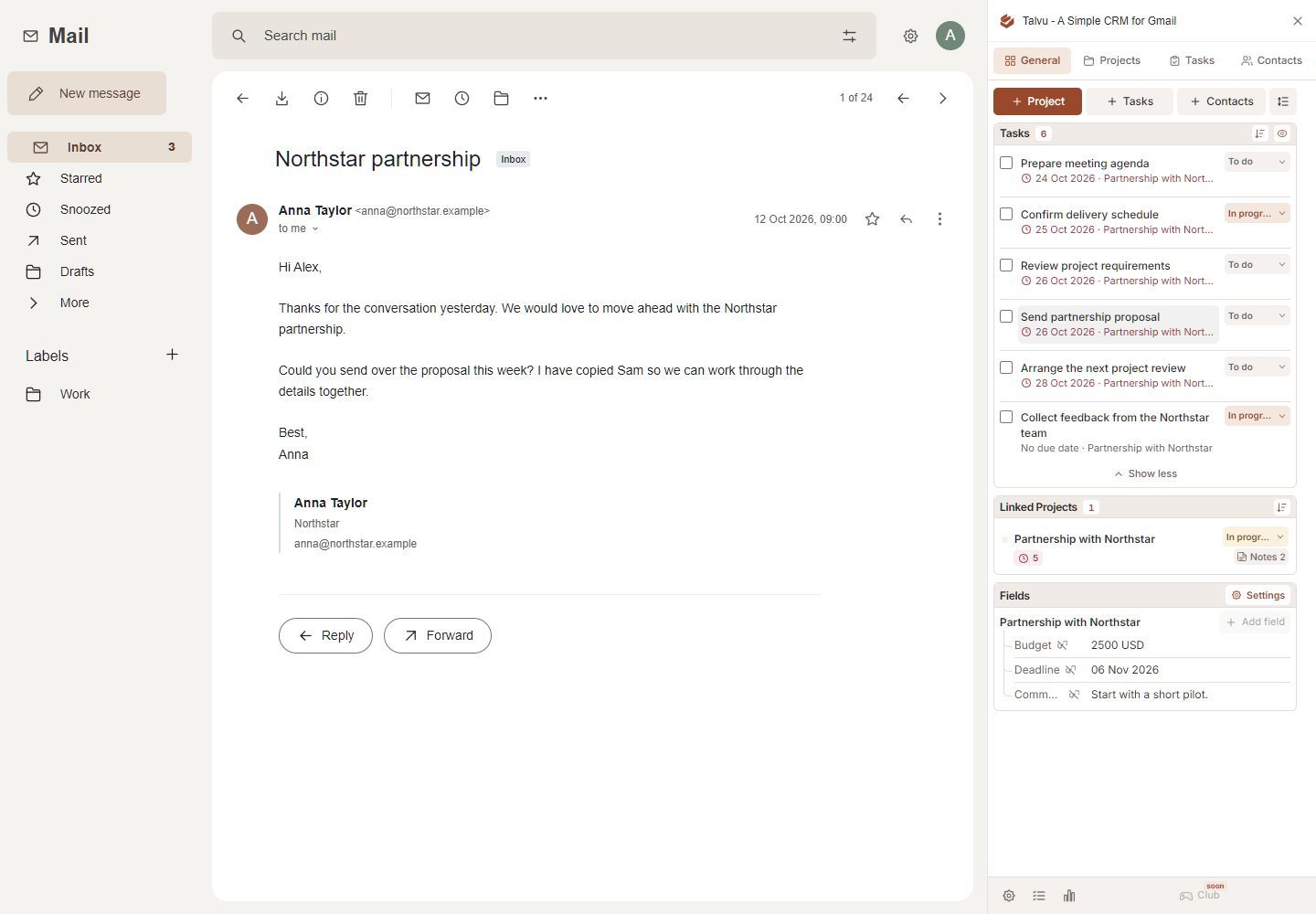
Use the trial to evaluate contacts, projects, tasks and notes in Gmail. When access expires, CRM work and synchronization pause; export and account deletion remain available under the current terms. The Talvu guide covers its feature scope.
Check the free edition before importing everything
Start with a small sample containing a customer, a prospect, a deal and a follow-up task. Log an incoming message and a reply, then confirm where they appear. Invite the people who will maintain the database and check access from their accounts.
Count users and records separately. Include companies and deals where those consume the same quota. Check the export format and price the first upgrade you are likely to need: another user, more contacts, automatic email capture or sequences.
If a contact list and reminders are sufficient, the Gmail-as-a-CRM setup guide offers a starting workflow. Choose a permanent free CRM when its limits fit the work you expect to keep doing. Use a trial when you are evaluating a paid product and have a budget for keeping it.