

Salesforce CRM for Gmail
Customer records in the Gmail sidebar
Salesforce CRM for Gmail puts customer records beside your inbox through a Chrome extension or Google Workspace add-on. The beta add-on can create a Free Suite organization. Automatic activity capture, email tracking and other Inbox tools have separate requirements.
What is Salesforce?
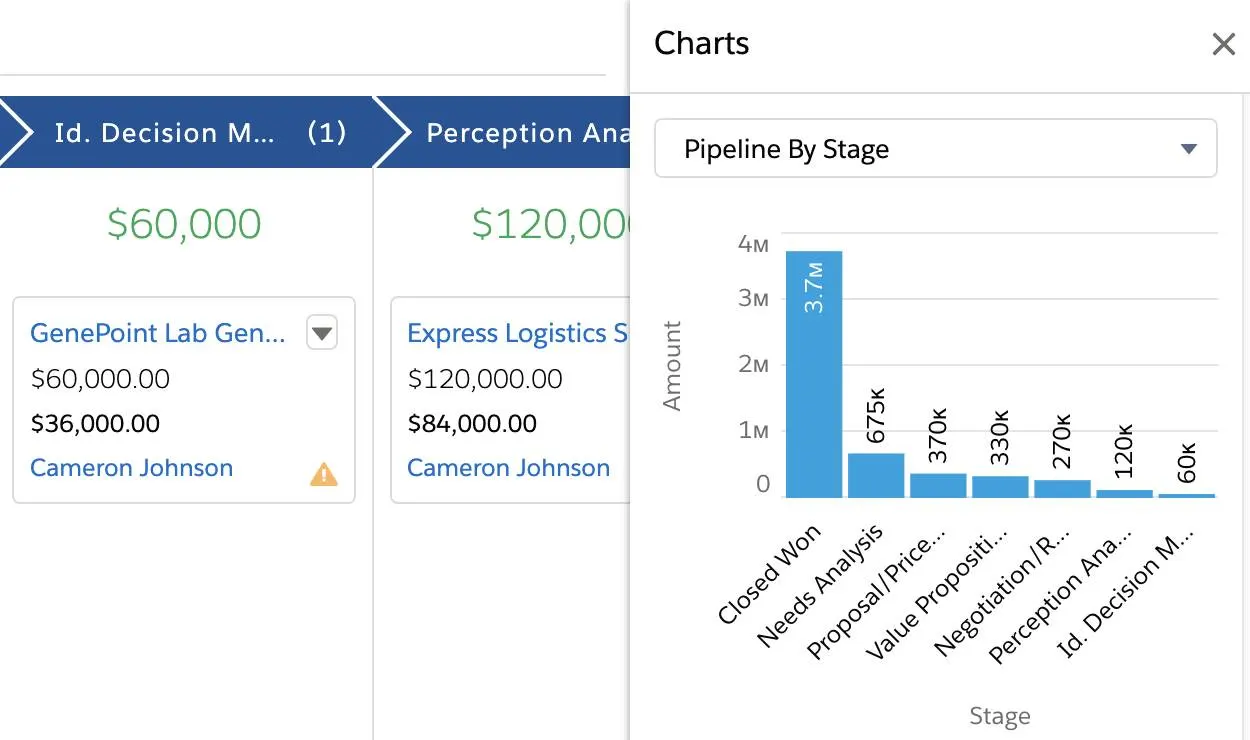
Salesforce stores accounts, contacts, leads and opportunities. The Opportunities Kanban board groups deals by stage and lets you move cards between columns as deals progress.
Free Suite includes two users, 10 GB of data storage per organization and 100 marketing email sends per month, with limits on custom fields and flows. Sign in at least once every 60 days to keep free access active.
Salesforce interface languages
Arabic, Bulgarian, Simplified Chinese, Traditional Chinese, Croatian, Czech, Danish, Dutch (Netherlands), British English, American English, Finnish, French, German, Greek, Hebrew, Hungarian, Indonesian, Italian, Japanese, Korean, Norwegian Bokmål, Polish, Brazilian Portuguese, Portuguese, Romanian, Russian, Slovak, Slovenian, Spanish, Mexican Spanish, Swedish, Thai, Turkish, Ukrainian, Vietnamese
Sales Cloud has 18 fully supported locales and 17 end-user locales. End-user translations exclude Setup, admin pages and Help; Thai Help remains in English. Gmail integration and individual cloud features may support fewer languages.
Who it suits
- Sales teams with an administrator to configure Gmail and record access
- Existing Salesforce users who want customer records beside email
Sales pipelines
Review deals by stage in the Opportunity Kanban, move cards between stages and see each stage's total.
Custom fields
Add up to 25 custom fields per object on Free or Starter. Pro raises the allowance and adds custom objects.
Email sync
Keep email activity, Google contacts and calendar events updated with Einstein Activity Capture on eligible editions.
How Salesforce works with Gmail
For the Chrome extension, an administrator enables Enhanced Email and Gmail Integration before users install the extension and connect their Salesforce accounts. Users can then log emails from Gmail. Set up Einstein Activity Capture for automatic activity logging.
A Google Workspace administrator installs the beta add-on for the domain. The first user can create a Free Suite organization. Its sidebar shows related records, today's Google Calendar events and open Salesforce tasks.
Starter and Pro include Einstein Activity Capture for automatic updates. Free Suite includes basic email and calendar integration.
Getting started
- Choose the Google Workspace beta add-on or Chrome extension, then check your edition and administrator setup requirements.
- For the Chrome extension, ask your Salesforce administrator to enable Enhanced Email and Gmail Integration, then install the extension and connect your account.
- Configure Einstein Activity Capture and its sharing rules for automatic email, contact and event updates. Assign the required Inbox license and permissions for additional Inbox tools.
Salesforce features
31 parameters · 8 groupsAccounts
Personal Gmail
Support for a personal Gmail account, not only a Google Workspace organization.
- Not verified
The beta add-on uses managed Google Workspace domain installation; personal Gmail eligibility is not verified. The Chrome extension has separate Workspace requirements.
Google Workspace
Support for Google Workspace Gmail accounts; administrator approval may be required.
- Available
The beta Gmail add-on supports Free Suite through administrator-managed Google Workspace installation. The Chrome extension has separate edition and setup requirements.
Customer records
Contacts
Create and maintain CRM records for individual people.
- Available
Companies
Store company information and link it to customer work through company records or fields on contacts.
- Available
Custom fields
User-defined fields on CRM records, beyond changing a layout or renaming a status.
- Available
Free and Starter include 25 custom fields per object; Pro includes 100. Advanced customization varies by edition.
Contact sync
Keep Google Contacts and the CRM in sync in one or both directions. A one-time import or browser capture is not ongoing sync.
- Plan-dependent
Einstein Activity Capture syncs Google contacts both ways by default; administrators can change the direction. Requires Google Workspace and an eligible edition or license.
Work management
Sales pipelines
Track sales opportunities or deals through defined stages. A general project list is not a sales pipeline.
- Available
Deals
Track sales opportunities with a status or stage. This includes projects used to manage deals.
- Available
Projects
Manage projects through dedicated records or workflows beyond tracking a sales opportunity.
- Not verified
Tasks
Create actionable tasks with an owner, status or due date.
- Available
Notes
Save internal notes associated with a contact, email or CRM record.
- Available
Files
Find, attach or download files linked to CRM records or conversations. Files may be stored in the CRM, linked from cloud storage or retrieved from email.
- Available
Upload and attach files to CRM records through the Files related list; an administrator may need to add it to the layout. Record/file permissions, upload limits and edition storage quotas apply. Gmail attachment logging has separate rules.
Web capture
Save a webpage link, selected text or an area capture directly from the browser into a CRM note or task. Contact extraction, manual copy and paste, and a URL field alone do not count.
- Not verified
Sales Cloud Everywhere creates tasks and CRM records from its browser sidebar and extracts prospect details. Direct capture of a webpage URL, selected text or screen area into a CRM note or task is not verified.
Reminders
Date-based or message-triggered reminders for a follow-up or task.
- Available
Supports task assignment notifications and reminders, including in the Salesforce mobile app.
Calendar sync
Keep Google Calendar and the CRM in sync. Creating a single event or sharing a booking link is not ongoing sync.
- Plan-dependent
Einstein Activity Capture supports Google Calendar event sync in either direction or both ways. Requires an eligible edition or license and administrator setup.
Email linking
Associate or log email conversations with a contact, project or CRM record.
- Available
Free Suite includes basic Gmail logging. The Chrome extension has edition, administrator setup and Enhanced Email requirements; supported Google accounts depend on the chosen route.
Email sync
Automatically update CRM email activity from new Gmail messages or their metadata, including rule-based capture. Copying message bodies or importing old mail is not required. Manual logging alone is not synchronization.
- Plan-dependent
Starter and Pro include Einstein Activity Capture. Other editions need eligible licenses and configuration. Free Suite includes basic Gmail integration; automatic capture on Free is not verified.
Email tracking
Track email opens, link clicks or both.
- Plan-dependent
Requires the appropriate Inbox license and permission.
Email templates
Reusable email message templates or snippets.
- Available
Free Suite includes custom and premade templates. Using templates in Gmail depends on the configured integration and Inbox tools.
Mail merge
Send personalized email to multiple contacts from one campaign or bulk-send workflow.
- Available
Free Suite supports List Sends to lists of leads or contacts, with 100 marketing sends per month. Merge-field preview is unavailable for Actionable Lists; higher editions raise sending limits.
Email scheduling
Schedule an outgoing email for a future send time.
- Plan-dependent
Starter and Pro can schedule List Sends; Free sends them immediately. Inbox Send Later requires an eligible license and permission.
Email sequences
Send a scheduled outreach sequence with multiple email steps. A single reminder is not a sequence.
- Plan-dependent
Starter and Pro include multi-email nurture campaigns. Sales Engagement cadences require an included or additional eligible license.
Collaboration
Shared inbox
A shared email workspace where multiple people handle the same conversations.
- Not verified
Team assignment
Assign customer work, records, tasks or conversations to another team member.
- Available
Supports task assignment notifications and reminders, including in the Salesforce mobile app.
Automation
Workflow automation
Use configurable triggers or rules beyond ordinary email sync, including task or record actions and contextual note reminders. Background sync alone is not workflow automation.
- Available
Free and Starter include five flows per type. Advanced processes, custom objects and integrations vary by edition.
Data
Reporting
Built-in CRM reporting or dashboards, including documented statistics views.
- Available
Data import
Import CRM records from a file or another supported data source.
- Available
Data export
Export CRM records or reports to a downloadable file.
- Available
Export reports as CSV or XLS. Full-backup frequency depends on edition.
API access
Work with CRM data through a documented developer API. A list of third-party integrations is not a developer API.
- Plan-dependent
Web Services API is a $25 USD/user/month add-on for Pro Suite; higher editions include access.
Mobile
Mobile CRM
Officially supported CRM access through a mobile app or mobile web interface.
- Available
Supports task assignment notifications and reminders in the Salesforce mobile app.
Gmail mobile
CRM functionality inside the Gmail Android or iOS application, normally through a Gmail add-on.
- Not verified
Pricing and plan requirements
Starter Suite plan
$25/user /month
Starter Suite · Billed monthly · Free Suite also available; Gmail eligibility varies by editionFree trial available
Free plan limits
2 users10 GB data storage100 marketing emails / month25 custom fieldsPer object
Gmail access has restrictions Free Suite includes basic Google email and calendar integration. Automatic activity capture through Einstein Activity Capture requires an eligible paid edition.
- Two users; no custom objects. Contact and record count limits are unverified.
- Sign in at least once every 60 days to keep Free Suite active.
What to check before choosing
- Free Suite includes basic Gmail integration. Starter and Pro add Einstein Activity Capture; email tracking and Send Later need the appropriate Inbox license.
- API access is a paid add-on for Pro; higher editions include it.
- Plan to use a managed Google Workspace domain for the beta add-on. Check account eligibility if you use personal Gmail.
Salesforce: common questions
Can I connect Gmail to Free Suite?
Yes. The Google Workspace beta add-on can create a Free Suite organization with basic email and calendar integration. Automatic capture needs an eligible edition or license.
Does the Gmail extension log email automatically?
Configure Einstein Activity Capture for automatic logging. The Chrome extension also lets users log emails manually.
What does Salesforce Inbox add in Gmail?
With a qualifying license and the Use Inbox permission, you can use email tracking and Send Later after connecting Gmail.
Compare Salesforce alternatives

HubSpot
Contact and deal records connected to Gmail


Talvu
Client projects, notes and tasks inside Gmail
Zoho CRM
Capture leads and contacts from Gmail
Product documentation
- Salesforce Free Suite and activity requirement
- Suite features, editions and allocations
- Salesforce beta add-on for Google Workspace Gmail
- Gmail Chrome extension setup and Enhanced Email
- Inbox license, tracking and Send Later
- How Einstein Activity Capture works
- Sales pricing and API entitlements
- Opportunity Kanban interface and workflow