

Talvu CRM for Small Teams: How Our Editors Use It
Our international editorial team uses Talvu. Here is why its simple structure, project notes, web capture and translated interface suit this kind of work.
We run several ranking projects with an international editorial team, and we use Talvu to keep contacts, project notes and next actions close to Gmail. For our small team, the appeal is a friendly interface with a clear structure and the essentials we need. Saving web material into notes and choosing one of seven interface translations are especially useful in our editorial work.
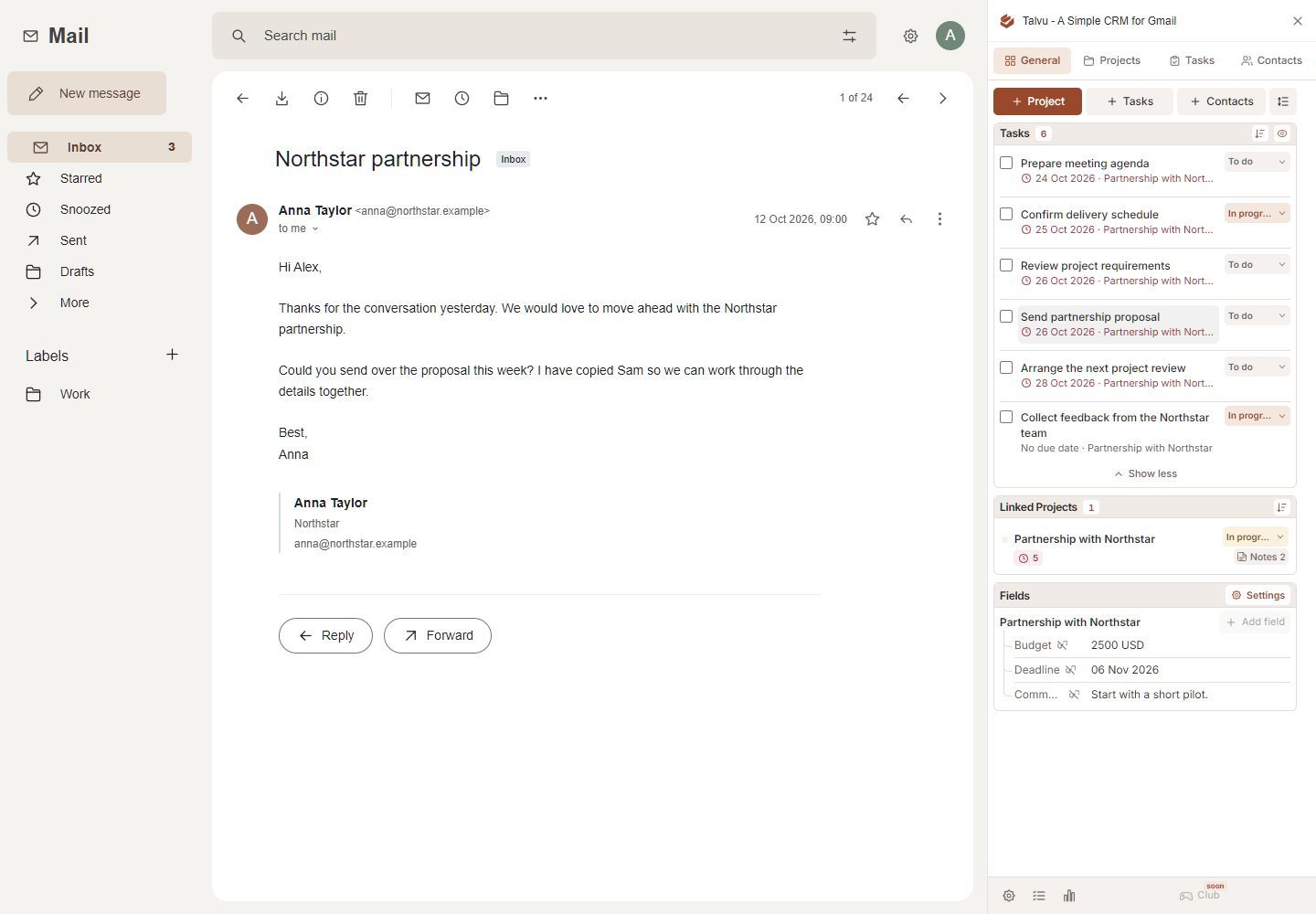
Why the simple structure matters to our editors
Ranking projects involve more than keeping a list of products. There are people to contact, questions to resolve, source pages to revisit and decisions to record. A CRM helps when those details remain close to the conversation that gives them meaning.
Talvu's structure is easy to describe. Contacts hold people and their company details. Projects organize a piece of work. Tasks record the next action, while Notes keep decisions and source material. We don't need a separate training course to understand where a contact, next action or note belongs.
You can start with the defaults, then adjust statuses, fields and the order of the visible blocks. Talvu's customization guide explains those controls. A small team can begin with the information it needs and add structure as its process becomes clearer.
For the complete feature inventory and setup details, read our Talvu product guide. Here, the focus is how that structure can support editorial work.
A practical setup for a ranking project
A useful way to organize this kind of work is to give each active relationship or commercial opportunity a clear project. Talvu calls these records Projects; they can also track deals through configurable statuses.
For example, a project named Supplier information update could contain the relevant contact, the email asking for clarification, a note explaining what needs verification and a dated task to check for a reply. This is an example setup you can adapt to your own work.
Start with four actions:
- Save the person. Check their name, email addresses and company information. Talvu stores company details on contacts, so keep the person's identity clear when several people represent one business. Its Contacts guide covers this record structure.
- Link the conversation. In the project's Email history, choose Link conversation. A project can gather several conversations, with shortcuts back to their messages, as described in the project guide.
- Write the next action. Use a concrete task title such as Check the updated integration documentation and choose a date when needed.
- Keep the decision with the project. A short note can explain what was confirmed and what still needs checking.
This gives the work a place to continue even when its details span several emails. Review open tasks as part of the working routine; saving the information is only the first step.
Notes that keep the source beside the detail
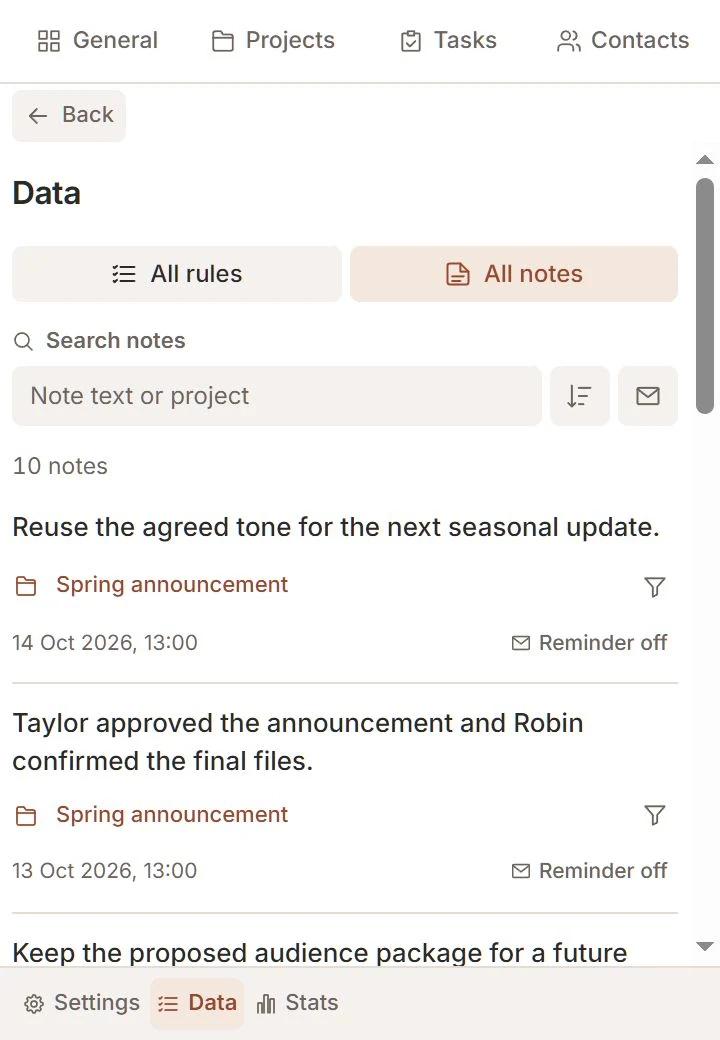
Notes and web capture are the most interesting part of Talvu for this use case. Research often produces a useful sentence, a pricing-page link or a small interface detail. Saving that material into the relevant project makes its purpose easier to recover later.
The documented capture workflow has three choices:
- Page saves the source-page link.
- Selected text saves a highlighted passage with its source.
- Area lets you draw a rectangle, review the crop and save the confirmed image area.
On a website, open Talvu's Chrome toolbar icon. Choose your account, active project and capture type, add a comment and save. Each capture becomes a project note. A comment such as Recheck this limit before updating the comparison explains why you kept the material.
Talvu's Notes and capture guide describes the conditions: Area requests optional website access, protected Google pages and Gmail are excluded, and your extension build must include the capture controls. Page saves a link rather than an archived copy of the website. Creating a task remains a separate action.
In our current 15-product comparison, Talvu is the only CRM with this complete capture-to-project-note workflow verified in our research. That is more specific than a general notes feature: it connects the saved detail to its source and the work it belongs to.
Bring a note back when a person writes
A saved note can also become an email-triggered reminder. Choose Remind, select the exact email addresses and confirm. Talvu displays the note beside new incoming mail from those addresses after activation, until you complete or switch off the reminder.
For editorial correspondence, this could be a prompt to ask a vendor about an unresolved feature claim when they next reply. It depends on a matching incoming email; a deadline you must meet still needs its own task. The same official Notes guide explains address matching and completion.
English plus seven translations for an international team
Our team is international, so an understandable interface in more than one language matters. Talvu offers eight interface languages in total: English, German, Spanish, Russian, Polish, Romanian, Italian and Ukrainian. That is English plus seven translations.
You choose the language in Settings → Language. According to the language settings documentation, a saved choice overrides the browser default. Project names, notes and other information you enter retain their original language.
This gives people a choice of interface language. It does not translate source quotations or rewrite editorial notes, so agree on how your team records information that others need to read.
What Talvu costs
Talvu's pricing lists $15 billed monthly, or $120 billed yearly, equivalent to $10 per month. Its 14-day trial includes all features. The trial starts with the first successful Gmail connection and requires no payment card; the billing guide also explains applicable tax and subscription management.
For comparison, here are Talvu's yearly subscription and the annual offers for Copper Basic, NetHunt Basic and Streak Pro, checked on November 1, 2026:
| Product and offer | Monthly equivalent with annual billing | Published billing unit |
|---|---|---|
| Talvu yearly | $10; $120 billed yearly | Subscription |
| Copper Basic | $23 | Per seat |
| NetHunt Basic | $24 | Per user |
| Streak Pro | $49 | Per user |
Talvu has the lowest listed monthly-equivalent amount among these four offers. They have different features and billing units, so budget against the subscriptions or seats your setup requires. Our free Gmail CRM guide covers permanent free options and their restrictions.
Check how your team needs to work
Talvu requires desktop Chrome and does not provide a mobile CRM workflow. Start with the official setup guide and check whether a Workspace administrator needs to approve access.
Also decide whether each person needs their own records or a common workspace. Talvu's account guide says separate Google accounts do not share contacts, projects or tasks. For a handoff, agree on how a colleague receives the relevant decisions and next actions.
Tasks have another clear boundary: Talvu tasks are separate from Google Tasks and are not automatically added to Google Calendar. Use the task list deliberately rather than expecting calendar synchronization.
For shared pipeline requirements or a different sales process, compare the options in our Streak alternatives guide. If you first want to establish a manual routine, our Gmail CRM setup guide walks through contacts, labels and dated follow-ups. For our editors, the useful combination is a clear project structure, source-linked notes and a choice of interface languages.