

CRM for Freelancers: A Simple Client Workflow with Talvu
Follow a freelance designer’s two jobs for one client in Talvu: separate projects, proposals, dated tasks, decision notes, web research and source emails, with desktop, account and export limits explained.
CRM for freelancers should connect each client’s jobs, conversations and next actions without mixing one commission with the next. Talvu fits a freelancer who works in Gmail on desktop Chrome: contacts, projects, tasks and notes sit beside the email. Its CRM data stays separate for each Google account, so two inboxes do not automatically share a client list.
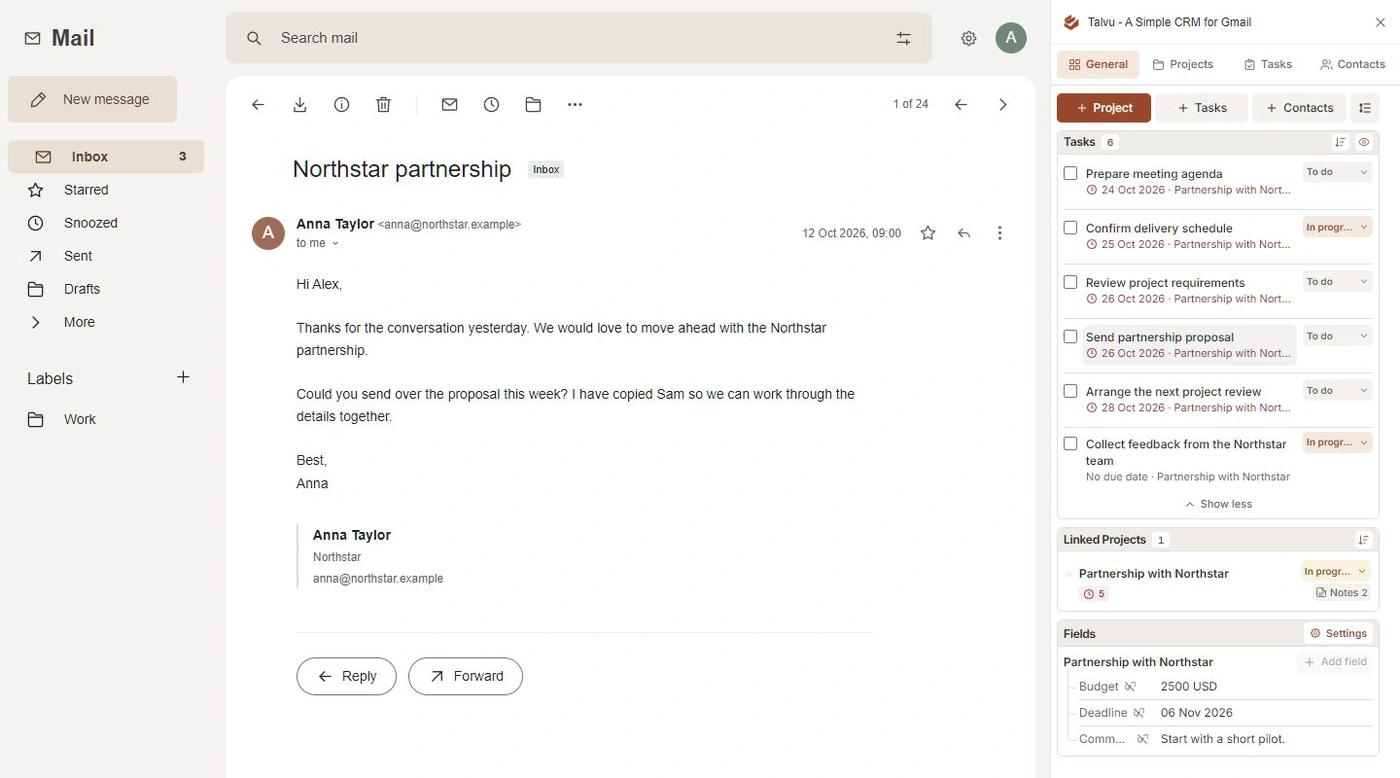
One client, two jobs
Imagine a freelance designer receives an enquiry about a website redesign. Save the client as a contact, including the relevant email addresses and company details. Create a project for the redesign and link the conversations about that work. Keep the contact as the person; use the project for the proposed job, its status and its decisions.
Later, the same client asks for launch graphics. Create another project instead of renaming the redesign or replacing its notes. Both jobs can involve the same person while keeping different scopes, deadlines and conversations. Talvu’s project and email guide explains that relationship. Start with statuses such as Enquiry, Proposal sent, Active and Closed, then adjust them to your work.
Give the proposal a next action
After the first enquiry, create a task such as “Send questions about the website scope on Thursday.” Link it to the redesign project and give it a date, with a time when useful. Complete the task when you send the questions. After sending the proposal, create “Ask whether the proposal needs changes on Tuesday.” A proposal waiting for a reply still needs a date for your own review.
Talvu’s task guide distinguishes a task’s relationship from its source-email bookmark. Check Linked email before saving: in Gmail conversation view, a new task uses the latest message in the conversation. That fixed bookmark helps you return to the request later. Talvu tasks are not Google Tasks and do not automatically create Google Calendar events; you still send the client’s follow-up yourself.
Keep decisions where the job lives
Use the project’s Notes area for the agreed scope, a decision’s reason and the question still awaiting an answer. “Client approved the simpler homepage; product photography remains outstanding” is more useful than a long pasted email chain. When the launch-graphics project starts, put its decisions there so the website history remains intact.
Record the next action as a task rather than burying it in a note. Our editors’ Talvu project-note workflow shows another way to keep research and project context together. The same habit helps a solo freelancer return to a job after working for another client.

Bring research back to the right project
Suppose you find a useful public reference for the redesign. On an ordinary website, open the Talvu extension from Chrome’s toolbar and select the account and active project. Choose Page to save the page link, Selected text to save a highlighted passage with its source, or Area to select and review an image crop. Add a short comment explaining why it matters, then save it to the project’s notes.
The web capture guide describes the required extension controls and optional website permissions. Gmail and protected Google pages are excluded. Page saves a link rather than a complete archived website; Area saves the crop you confirm. Capture creates a note, so add a separate task if the research calls for action. Confirm the destination before saving, particularly when you have several client projects open.
Find the original email and files
When the client sends a revised brief, return through the task’s saved email link or the project’s linked conversations. Talvu’s project Files guide covers attachments from those conversations, with source-email and download actions. Keep important delivery files in your agreed file-storage workflow: the CRM view is not a separate server archive.
The distinction also matters when leaving a tool. Talvu’s CSV or XLSX export contains CRM records, relationships, notes and reminder settings; it is not a Gmail backup or an importer. Captured image details can be exported, but the image files and permanent image-download links are excluded. Check what you need to retain before relying on an export.
Check the cost against your working day
As checked on 2 November 2026, Talvu’s billing guide lists base USD prices before tax: $15 monthly or $120 yearly, equivalent to $10 per month. The 14-day trial includes all features and starts with the first successful Gmail connection. Choose the billing commitment deliberately, and confirm licensing separately if you add another Google account or other people.
During the trial, follow the enquiry through a proposal, a changed deadline and a second job. Retrieve a note, check a source bookmark and inspect an export. The Talvu product guide gives broader feature context. If basic contacts and dated tasks already cover your needs, the manual Gmail workflow may suffice; if you need another device model or shared account structure, compare the Gmail CRM options.