

Email Tracking Accuracy: Why an Open Is Not Proof of a Reader
An open notification records a signal, not a person's attention. Learn how image loading, privacy tools, forwarding and inferred events affect tracking, and how to follow up without making unsupported assumptions.
Email tracking accuracy depends on what produced the event. An open notification may come from an image loading, a preview or an inferred interaction; it does not prove that the named recipient read your proposal. A real reader can also leave no open event. Use tracking as a clue alongside the conversation and an agreed next step, rather than as evidence of someone's attention or buying intent.

What an open event actually records
Many email trackers place a small remote image inside an HTML message. Mailchimp explains this image-based mechanism: loading the graphic can register an open. That measures a request to a server. It cannot show whether someone understood the message, considered the price or decided to reply.
The event may also be calculated from another action. HubSpot documents inferred opens: when no open was recorded, a first tracked click or reply can create one using that interaction's timestamp. An open time in a report therefore need not be the time a person first read the email.
The same notification can have different explanations
| What you see | A possible explanation | What remains unknown |
|---|---|---|
| An open shortly after sending | Background image loading or a preview pane | Whether the recipient read the message |
| Repeated opens | Self-opens, forwarding or another image request | Who looked, for how long, or with what intent |
| No open, but a reply arrives | Images were blocked or the message was read without the tracking image | The actual first reading time |
| A click without a reply | A person followed a link, or an automated system inspected it | Whether a human evaluated the linked page |
These are possible causes, not a way to diagnose a recipient's device from an alert. Apple's Mail Privacy Protection downloads remote content in the background when Protect Mail Activity is enabled, regardless of engagement. That makes an image request insufficient evidence of a deliberate human read.
Automated systems add another source of ambiguity. Mailgun's bot-detection documentation describes security checks that retrieve images or follow links. Detection is an attempt to classify activity. A provider reporting no detected bot is not certifying that a human performed the action.
HubSpot likewise filters activity it identifies as non-human for one-to-one email. Its documentation also describes preview panes, self-opens and forwarded messages. Forwarding can preserve the original tracking identifiers, so later activity may still appear against the first recipient. Repeated events are not a list of distinct readers.
A reader can be present while the tracker stays silent
A plain-text message has no embedded tracking image. A mail client can block images, and a company's security system may remove them. In those cases a person can read the message without producing the expected image request. No recorded open is therefore a weak reason to conclude that your email was ignored.
A reply does not repair every missing detail retrospectively. It shows that someone responded, but it does not establish exactly when they first saw the proposal. Keep the known action and the unknown reading time separate in your CRM notes.
Track and Log solve different problems in Gmail
In HubSpot's Gmail extension, Track monitors engagement and Log saves the email to selected CRM records. They are separate controls. Finding a message in a contact's history does not establish that tracking was enabled or that tracking data exists.
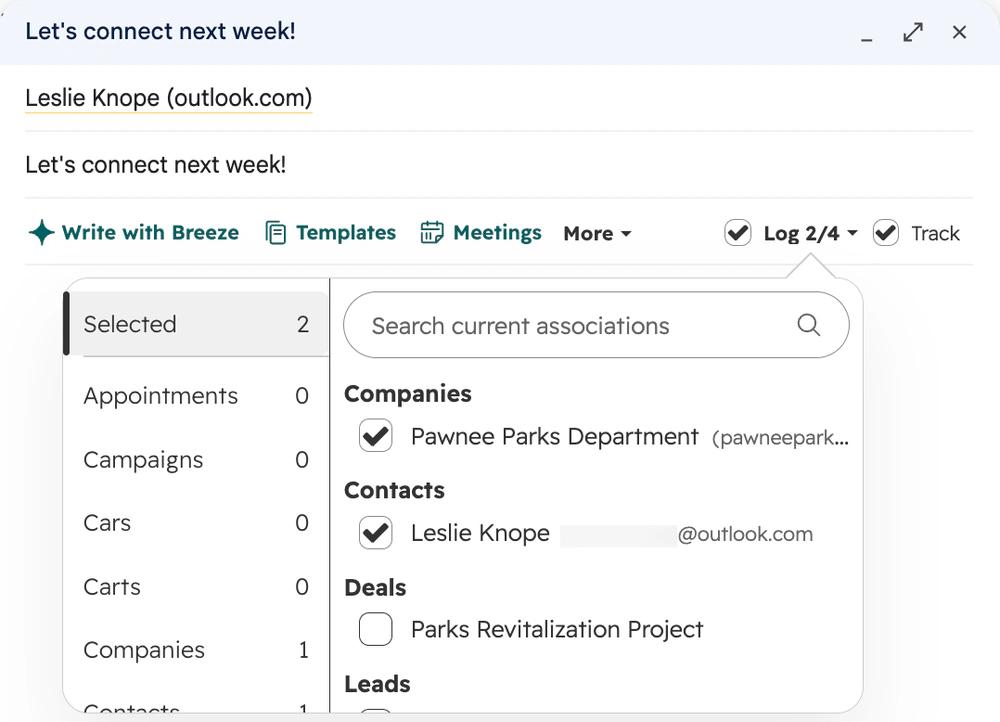
The Log dropdown in this example chooses records receiving the email. Its selection count is not an open count. Before investigating an apparently missing event, check which control was enabled when the message was sent, the account's applicable settings and whether the recipient's client could load the image.
For the broader distinction between the Gmail panel, CRM records and connection methods, see our HubSpot CRM for Gmail guide. Moving between a logged message and an engagement report should not change the meaning you assign to either.
A proposal alert is not a customer conversation
Imagine sending a revised proposal to a client who said they would discuss it with a colleague. An open alert arrives almost immediately, then several more appear. It is tempting to write, ‘They keep checking the price,’ and chase a decision that afternoon.
The events support a smaller statement: activity was recorded against that message. They do not establish who generated it or what the client thinks. The proposal may have been previewed, forwarded for approval or fetched in the background. The agreed review date is still the more useful basis for your next task.
A follow-up such as ‘Do you have everything needed for the review we discussed?’ fits the conversation. ‘I can see you opened it repeatedly’ turns uncertain telemetry into a claim about someone's behavior. It can also distract from the actual question you need answered.
Choose the next action from stronger evidence
- Use a promised response date or an approaching deadline to set the next task. An open alert alone should not move a deal to an agreed or committed stage.
- Record a meaningful reply, a confirmed meeting or another completed action separately from an open or click. Even a reply needs context: an automatic absence message is not a buying decision.
- When comparing messages, note whether the same tracking mechanism and client conditions apply. Do not turn a mixture of image requests and inferred events into an invented accuracy percentage.
A dated task, the original email and a short decision note are enough to keep this distinction visible. Our practical guide to using Gmail as a CRM explains how to organize those next actions without relying on an open notification as the task trigger.
Check the mechanism before switching tools
If your own tracking looks inconsistent, try a small controlled check with accounts you control and a harmless message. Compare an HTML message with images enabled, one with images disabled, and a plain-text message. Check logging separately from engagement events. Do not use a client's private correspondence as test material.
That exercise can explain your configuration, but it is not a benchmark for all recipients or all email services. A different tool may provide clearer reporting or better workflow controls without overcoming image blocking, privacy features or every automated request.
Use the CRM for Gmail comparison to evaluate the surrounding workflow: where messages are kept, how tasks are assigned and what your team can access. An impressive-looking open report is a narrow part of that decision.
‘Proposal sent; no reply yet; review agreed for Thursday’ is a note you can act on. ‘The client read it and is interested’ needs evidence the open event cannot supply.