

Shared Inbox vs CRM: Who Owns the Reply and the Relationship?
A shared inbox coordinates replies; a CRM organizes the continuing customer relationship. Learn when one is enough, when both help and how to set clear ownership without confusing mailbox access with CRM permissions.
Shared inbox vs CRM is a choice between coordinating replies and organizing the continuing customer relationship. Use a shared inbox when two colleagues need one owner for a client request; add CRM records when that client has several jobs, contacts and decisions to preserve. Some products cover both, but mailbox access alone does not assign the next reply or establish access to every CRM-linked message.
Start with the question your team cannot answer
If colleagues keep asking “Has anyone replied to this?”, start by examining conversation ownership. A common address that forwards messages to several personal inboxes gives people copies. It does not, by itself, establish one shared status or identify the person responsible for the next reply. Being copied on an email is not the same as accepting the work.
If the question is “Which proposal is this, and what did we agree last month?”, you need relationship context. One customer may have several contacts, open jobs and unrelated email threads. The CRM record should preserve the relevant stage, notes and next action even when a particular conversation ends.
What a shared inbox should make visible
For a small service team, define an owner, a status and a next action for each open request. Choose statuses with practical meanings, such as New, In progress, Waiting for customer and Resolved. Decide what happens when the owner is away and who reviews unassigned work. Check that the chosen tool supports those ownership and status rules.
Google documents Collaborative Inbox groups: suitably permitted members can take or assign conversations, search by assignment and mark conversations complete, as duplicates or needing no action. A group owner or manager must enable the features and grant the required permissions. For work or school accounts, administrator settings and Groups for Business availability matter.
Google also documents email delegation. Delegates can receive authorized access to read, send or delete mail, subject to organization settings. Delegation is mailbox access; do not treat it as proof of a complete assignment queue. Use authorized individual access rather than a shared password.
What the CRM record adds
Consider a design agency. A client emails the general address to ask for a new proposal. The inbox owner handles that request. The project or opportunity record holds the proposed scope, stage and decision notes. A later message about an older completed job should not silently change the stage of the new opportunity.
Streak’s pipeline guide describes records called boxes, stages and data columns inside Gmail. A box can represent a deal or project and hold related information. That is different from marking one email resolved. The Streak review explains its Gmail workflow; verify the plan and permissions needed for your team.

HubSpot email logging provides another useful distinction. Saving a message to a CRM timeline can preserve relationship history. It does not, on its own, tell two colleagues which one should send the next reply. Likewise, an inbox assignment does not necessarily update an opportunity’s stage or next task.
One product can cover both, with conditions
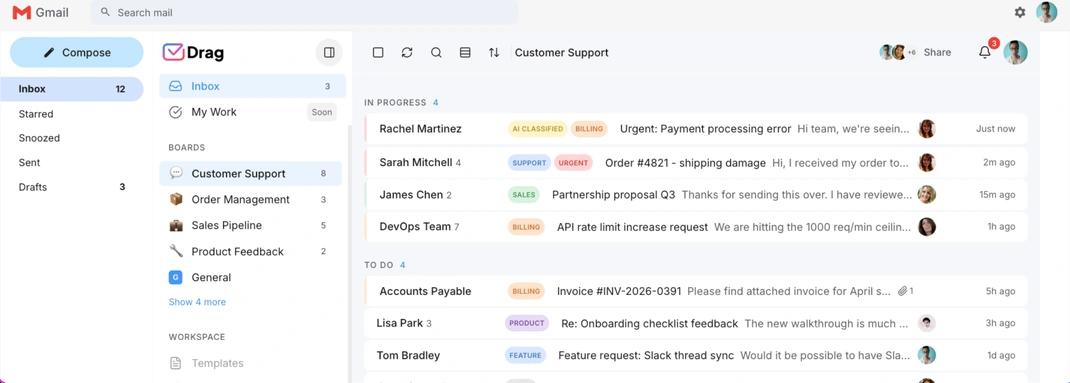
Drag describes shared Gmail boards with stages and ownership for email-led work. This can suit a simple process whose work stays attached to conversations. Check the exact record model, automation limits and reporting you need instead of assuming that every board is a complete CRM. Our Drag guide provides a product-specific starting point.
Also check visibility separately from editing rights. Streak’s email-sharing documentation explains that side-conversation messages can remain private until shared. Seeing a record is not proof of access to every underlying message. Pipeline permissions are another separate control.
Talvu illustrates a different boundary: its account guide says that different Google accounts keep separate contacts, projects and tasks. Do not infer a shared team workspace or mailbox assignment system from an individual Gmail CRM panel.
Pilot the handoff before buying
Test one request with two authorized colleagues: assign it, reply, wait for the customer, hand it over and resolve it. Then open a new thread from the same client about a different job. Check whether you can identify both the conversation owner and the correct continuing record without guessing.
If you use two tools, choose which owns reply status and which owns project stage. Document who updates each, and verify any claimed synchronization with the actual integration and plan. Compare seats, shared addresses and required features before paying. The Gmail CRM ranking helps shortlist products, but the final choice should follow the handoff your team needs to perform.
For a different kind of workflow, our editorial Talvu article shows how we keep project notes and next actions close to Gmail. That is a separate use case from assigning a shared inbox.