

Nimble CRM for Gmail
Contact history and reminders in Gmail
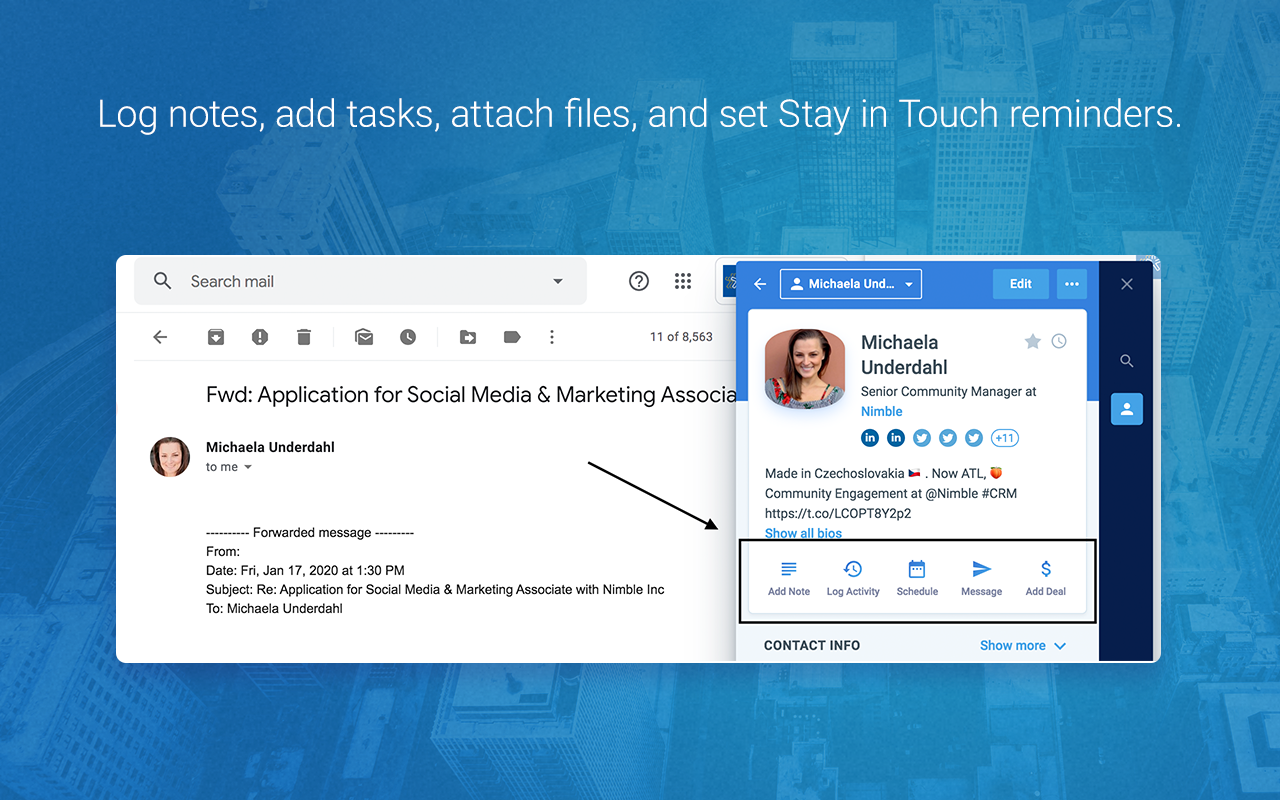
Nimble CRM for Gmail connects your inbox to a separate app for contacts, sales pipelines and outreach. The Prospector extension shows contact details in Gmail, while email sync keeps conversations in Nimble.
What is Nimble?
Keep separate records for people and companies. Tags, saved segments and bulk actions let you work with groups of contacts before adding them to a sales pipeline.
Track deals in customizable pipelines and review sales reports. Tasks, events and repeatable workflows also sit alongside contact records, so you can manage follow-up before a relationship becomes a sales opportunity.
Nimble interface languages
English
Nimble is available in English. Customer data and message content can use other languages without changing the CRM interface.
Who it suits
- Sales teams managing contact networks and deal pipelines
- Consultants who need contact history and scheduled outreach
Contacts
Separate person and company records support tags, saved segments and bulk editing. Group contacts by the relationships you need to manage.
Sales pipelines
Create multiple sales pipelines with your own stages. Use sales reports to track progress across the deals in each process.
Email sequences
Schedule multi-step emails from your own address, using templates and recipient actions. Set an exit rule for replies so contacts leave the sequence once they respond.
How Nimble works with Gmail
Connect personal Gmail or Google Workspace in Nimble's Email Settings. Messages sync automatically to the Message tab. Open a thread to view or create a contact, reply or set a follow-up reminder.
Prospector shows contact details while you work in Gmail or browse websites. Open Nimble itself to manage the full contact database, pipelines and reports.
Getting started
- Connect Gmail through Settings > Email Settings. Confirm that new messages appear in the Message tab and resolve any credential warning.
- Import your contacts, check the People and Companies records, then add tags or saved segments you will use for follow-up.
- Select Google contact groups for a one-time or weekly import. Connect your Google calendars separately.
Nimble features
31 parameters · 8 groupsAccounts
Personal Gmail
Support for a personal Gmail account, not only a Google Workspace organization.
- Available
Connect personal Gmail to sync messages into Nimble.
Google Workspace
Support for Google Workspace Gmail accounts; administrator approval may be required.
- Available
Connect Google Workspace to sync Gmail messages into Nimble.
Customer records
Contacts
Create and maintain CRM records for individual people.
- Available
Companies
Store company information and link it to customer work through company records or fields on contacts.
- Available
Custom fields
User-defined fields on CRM records, beyond changing a layout or renaming a status.
- Available
Contact sync
Keep Google Contacts and the CRM in sync in one or both directions. A one-time import or browser capture is not ongoing sync.
- Available
New Google Contacts are imported into Nimble weekly. Changes in Nimble do not sync back to Google.
Work management
Sales pipelines
Track sales opportunities or deals through defined stages. A general project list is not a sales pipeline.
- Available
Deals
Track sales opportunities with a status or stage. This includes projects used to manage deals.
- Available
Projects
Manage projects through dedicated records or workflows beyond tracking a sales opportunity.
- Not verified
Tasks
Create actionable tasks with an owner, status or due date.
- Available
Notes
Save internal notes associated with a contact, email or CRM record.
- Available
Files
Find, attach or download files linked to CRM records or conversations. Files may be stored in the CRM, linked from cloud storage or retrieved from email.
- Available
Attach files from a computer, Google Drive, OneDrive or Dropbox to contacts and deals. Selected files can also appear on workflow cards. The file list shows each attachment's source. Storage is 2 GB per seat; extra capacity costs more.
Web capture
Save a webpage link, selected text or an area capture directly from the browser into a CRM note or task. Contact extraction, manual copy and paste, and a URL field alone do not count.
- Not verified
Prospector captures contact profiles and lets you add notes or tasks from its browser panel. Saving a webpage URL, selected text or a page area directly into a CRM note or task was not verified.
Reminders
Date-based or message-triggered reminders for a follow-up or task.
- Available
Set date-based reminders or follow up when an email receives no reply.
Calendar sync
Keep Google Calendar and the CRM in sync. Creating a single event or sharing a booking link is not ongoing sync.
- Available
Two-way integration with multiple Google calendars. Google events refresh hourly while signed in to Nimble and every three hours otherwise. Edit or delete events in Google Calendar.
Email linking
Associate or log email conversations with a contact, project or CRM record.
- Available
Connected Gmail conversations are saved in Nimble.
Email sync
Automatically update CRM email activity from new Gmail messages or their metadata, including rule-based capture. Copying message bodies or importing old mail is not required. Manual logging alone is not synchronization.
- Available
Gmail messages sync automatically into Nimble. Personal Gmail and Google Workspace are supported.
Email tracking
Track email opens, link clicks or both.
- Available
Track opens and link clicks on personalized group messages. Sending limits apply.
Email templates
Reusable email message templates or snippets.
- Available
Mail merge
Send personalized email to multiple contacts from one campaign or bulk-send workflow.
- Available
Send personalized group messages with open and click tracking. Sending limits apply.
Email scheduling
Schedule an outgoing email for a future send time.
- Available
Email sequences
Send a scheduled outreach sequence with multiple email steps. A single reminder is not a sequence.
- Available
Collaboration
Shared inbox
A shared email workspace where multiple people handle the same conversations.
- Not verified
Team assignment
Assign customer work, records, tasks or conversations to another team member.
- Available
Automation
Workflow automation
Use configurable triggers or rules beyond ordinary email sync, including task or record actions and contextual note reminders. Background sync alone is not workflow automation.
- Available
Data
Reporting
Built-in CRM reporting or dashboards, including documented statistics views.
- Available
Data import
Import CRM records from a file or another supported data source.
- Available
Data export
Export CRM records or reports to a downloadable file.
- Available
API access
Work with CRM data through a documented developer API. A list of third-party integrations is not a developer API.
- Available
Use an admin-generated API token for account access. Older-account and third-party REST/OAuth access has separate application requirements.
Mobile
Mobile CRM
Officially supported CRM access through a mobile app or mobile web interface.
- Available
Gmail mobile
CRM functionality inside the Gmail Android or iOS application, normally through a Gmail add-on.
- Not verified
Pricing and plan requirements
Business plan
$24.90/user /month
Business · Billed yearlyFree trial available
What to check before choosing
- The subscription includes 25,000 contacts per account, 2 GB of storage per seat and 1,000 group messages per license per month. Additional capacity and the email marketing add-on cost extra.
- Google contact imports run weekly and add new contacts. This does not provide immediate, two-way contact synchronization.
- Google Calendar refreshes hourly while you are active in Nimble and every three hours otherwise. Edit or delete events in Google Calendar.
Nimble: common questions
Can I use Nimble with a personal Gmail account?
Yes. Connect personal Gmail or Google Workspace to sync messages into Nimble. Messages update faster while you are active in Nimble.
Are email sequences included in Nimble?
Yes. Email sequences are included without a plan upgrade. You can schedule steps and use recipient actions to control follow-ups. The email marketing add-on has a separate charge and campaign allowances.
Does Nimble offer a permanent free CRM plan?
Nimble's current offer is a 14-day trial of its paid CRM. Pricing is $24.90 per seat per month billed annually, or $29.90 billed monthly. Extra contacts, storage and outreach capacity cost more.
Compare Nimble alternatives

Talvu
Client projects, notes and tasks inside Gmail


folk
Shared contact groups and Gmail outreach
Capsule
Save Gmail conversations and create tasks